Tensor Art AI is a cloud based AI generation platform built around flexibility, model variety, and user control. It covers image and video generation, letting you work with different AI models, styles, and configurations with no local setup required.
The platform targets users who want deeper control over their outputs while still working in an accessible interface.
This article breaks down how Tensor Art works, what it offers, where it performs well, and where it falls short, so you can decide whether it belongs in your workflow.
What Tensor Art AI Actually Does Beyond Basic Image Generation
Tensor Art gathers different visual engines under one roof, letting you switch between styles and approaches without leaving the platform. The library runs to over 1 million models and LoRAs, available even on the free tier, opening access to a wide range of visual interpretations from highly realistic outputs to stylized anime inspired imagery and experimental artistic renders. That variety changes the experience, because the same prompt can lead to entirely different results depending on the model you choose.
The platform also lets you train models, which separates it from tools that only let you generate. LoRA training is available on the free tier, and Pro extends that to larger scale training on up to 1,000 medias, with the option to continue training an existing model and to keep your own models private.
Underneath the surface, it offers a real level of control. You can shape how an image forms by adjusting parameters like detail intensity, scale, and composition behavior. These work as creative levers that influence how the system interprets your idea, giving you a hand in how the image comes together.
Everything runs in the cloud, which removes the friction of setup. You can move between devices and keep the same capabilities, which makes the platform feel fluid and accessible. That convenience comes paired with a credit system that manages usage and rewards thoughtful generation over endless trial and error.
The community environment is another defining layer. Users can explore prompts, study outputs, and see how others achieve specific styles. The platform doubles as a learning space where experimentation becomes part of the process, letting you observe patterns, refine your approach, and build a stronger sense of visual direction over time.
How Tensor Art AI Works
Tensor Art AI follows a structured yet flexible workflow that gives you more control than basic image generation tools. The process starts by selecting a model, which determines the style and behavior of the output. Different models suit different types of visuals, such as realistic images, stylized art, or character design.
After choosing a model, you enter a prompt describing the image you want. The clarity of that input plays a major role in the final result, since the system adapts its output based on both the prompt and the selected model.
From there you can adjust settings like image size, detail level, and guidance strength. These controls allow fine tuning of the output, giving you more flexibility than tools that run on default configurations alone.
Once an image generates, you can refine the result by adjusting inputs or regenerating variations. The process rewards experimentation, since different combinations of models and settings produce significantly different outcomes.
What matters most in Tensor Art is the combination of model selection and prompt quality. Both directly influence how accurate and visually appealing your results will be.
Real Use Cases: Who Should Actually Use Tensor Art
Tensor Art AI suits users who want control over image generation without installing or managing local systems. It works particularly well in environments where flexibility and experimentation matter.
Digital artists use it to explore different styles and visual directions, especially when testing how various models interpret the same concept.
Content creators rely on it to generate unique visuals that stand out, particularly when they need more variety than simpler tools provide.
Designers use Tensor Art during the concept phase, where multiple variations and styles help shape creative direction before finalizing designs.
AI enthusiasts are drawn to the platform because it allows experimentation with different models and settings, offering a deeper level of interaction than basic tools.
Game creators use it to develop characters and environments, taking advantage of the variety of models available to explore different visual styles during early development.
Pricing Breakdown: Is It Worth It?
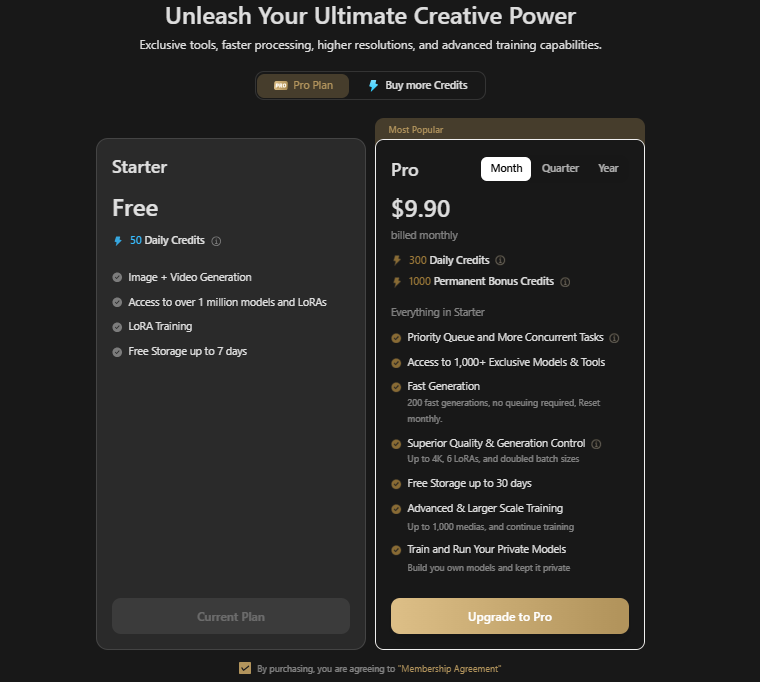
Tensor Art runs on a credit based system with one free tier and a single Pro tier sold on three billing cycles.
Starter, the free plan
- 50 daily credits
- Image and video generation
- Access to over 1 million models and LoRAs
- LoRA training
- Free storage for up to 7 days
Pro plans
Every Pro tier carries the same 300 daily credits and the same feature set. What changes between them is the one-off permanent bonus credit grant and the effective monthly cost.
- Monthly at $9.90, with 1,000 permanent bonus credits
- Quarterly at $21.90, discounted 26% from a $29.70 list price, with 5,000 permanent bonus credits
- Yearly at $69.90, discounted 40% from a $118.80 list price, with 25,000 permanent bonus credits. That works out near $5.83 a month
What Pro adds on top of Starter
- Priority queue and more concurrent tasks
- Access to 1,000+ exclusive models and tools
- 200 fast generations per month with no queuing, reset monthly
- Superior quality and generation control, covering output up to 4K, 6 LoRAs applied at once, and doubled batch sizes
- Free storage for up to 30 days
- Advanced and larger scale training, handling up to 1,000 medias with the option to continue training
- Training and running your own private models
One-time credit packs
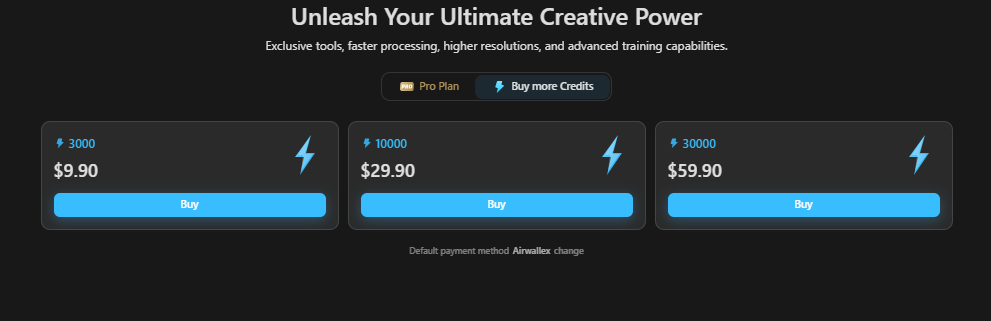
Credits can also be bought outright, with no subscription attached.
- 3,000 credits for $9.90
- 10,000 credits for $29.90
- 30,000 credits for $59.90
Value
The yearly plan carries the clearest advantage. At $69.90 it lands near $5.83 a month against $9.90 billed monthly, and the 25,000 permanent bonus credits are 25 times what a monthly subscription grants. Quarterly sits in between for anyone testing the platform before committing to a full year.
Worth noting how the credit packs compare against a subscription. At $9.90 a month, Pro delivers 300 daily credits, which comes to roughly 9,000 credits over 30 days plus the 1,000 bonus. The same $9.90 spent on a one-time pack buys 3,000 credits with no expiry attached. Heavy users get far more throughput from the subscription, while occasional users may prefer packs that sit in the account until needed.
Pricing stays cost effective for moderate use and climbs for heavy users who exhaust 300 daily credits and start buying packs on top of a subscription. The quarterly and yearly prices above are both discounted rates, and Tensor.Art runs these promotions often, so check the current figure before purchasing.
Pros and Cons of Tensor Art AI
Pros
- Multiple models available
- Flexible settings
- Cloud based access
- Strong community
Cons
- Credit limitations
- Learning curve
- Inconsistent outputs
Alternatives to Tensor Art AI
If Tensor Art does not match your workflow, several alternatives approach image generation from different angles.
Fooocus offers a local solution that removes usage limits entirely. Once installed, it allows continuous generation with no credits involved, which suits users who want independence and control without ongoing costs. Performance depends heavily on your system’s capability.
Automatic1111 is a more advanced interface built around Stable Diffusion, designed for deep customization. It exposes a wide range of settings and tools, giving full control over the generation process. That power comes with demands on your time and understanding before you can use it effectively.
Midjourney focuses on artistic consistency and visual quality. It produces refined, expressive images that often need less technical adjustment. The trade off is tighter limits on fine tuning compared to more technical platforms.
Leonardo AI is built for precision and detail, particularly in concept art and design assets. It gives more structured outputs and better control over visual clarity, which suits professional level work once you have put in the learning time.
NightCafe provides a more accessible experience, balancing customization with ease of use. Its community features appeal to users who want to explore and learn as they generate.
Why People Choose Tensor Art Over Alternatives
Tensor Art appeals to users who want variety without complexity. It delivers the feeling of having multiple tools inside one platform while sparing you technical setups and environment switching. That suits people who like experimenting with different styles and want to skip complicated workflows.
The balance it strikes is the other draw. It gives more control than basic generators while staying easier to use than fully technical systems. That middle ground lets users grow into the tool at their own pace.
Where Tensor Art Falls Short
Tensor Art carries several notable limitations. The most prominent is inconsistent quality, since the vast array of available models can produce drastically varying results depending on which one you choose. The platform also operates on a credit system that caps your usage over time, requiring careful management of your resources. Finally, there is a distinct learning curve, since users must invest time in understanding the specific settings and parameters that coax out the best generations.
Smarter Workflow: How to Use Tensor Art More Effectively
For the best results, treat Tensor Art as one component of a broader creative workflow. The most effective strategy uses the platform for initial image generation, then exports those raw files into dedicated editing software for post processing refinement. This hybrid approach improves overall quality, holds visual consistency across a project, and delivers a much more polished final output.
Tips to Get Better Results from Tensor Art AI
Using Tensor Art well comes down to understanding that every model behaves like a different artist. Approach the platform as a collection of styles, each one rewarding a slightly different way of prompting.
Spend time observing how a model responds before trying to perfect results. Run simple prompts first, study how it handles lighting, faces, or textures, then build complexity gradually. That saves time compared to blindly adjusting everything at once.
Treat settings as fine tuning tools. Let the model do most of the work, then use adjustments to polish direction.
Common Mistakes to Avoid
The most common mistake is jumping between models too quickly without understanding how each one behaves. That creates inconsistent results and makes improvement harder, because no learning curve ever gets built.
Over reliance on settings is the second issue. Many users try to fix weak outputs by changing technical values when the real problem is a prompt that lacks clarity or intent.
There is also a tendency to chase perfection too early. Tensor Art works as a process of iteration. Expecting a finished image on the first generation usually leads to frustration.
The Future of Image Generation with Tensor Art
Tensor Art points toward a future where creative tools stay open across systems and styles. Users will move freely between different visual engines within the same environment, with smoother transitions and better compatibility between styles.
Image quality will continue to improve across all models, including the niche and experimental ones. That means creative exploration costs less in output quality than it once did.
Intelligent assistance is the other major shift ahead. The platform itself may begin suggesting models, adjusting parameters automatically, and recommending prompt improvements based on intent. That lowers the learning curve while keeping creative control in the user’s hands.
Tensor Art’s direction points toward an adaptive system that evolves with the user, helping them generate images and understand how to get better results over time.
Is Tensor Art Enough for Professional Work?
Tensor Art supports professional workflows in areas like concept design, content creation, and visual exploration. It is particularly strong in the early stages, where ideas need visualizing quickly and testing across different styles.
Final production work still demands refinement. Professional output requires precision, consistency, and detailed editing that go beyond initial generation. In practice, Tensor Art earns its place as a creative starting point.
Wrap Up
Tensor Art AI encourages experimentation. It opens multiple paths and lets you decide which direction to explore, turning the work from simply generating images into discovering styles and approaches.
Mastery takes time. The more you use it, the more you understand how different models behave and how small changes influence the outcome. That learning curve is part of the appeal, since it rewards curiosity.
For users who enjoy exploring visual possibilities and want access to different creative directions without dealing with setup, Tensor Art offers a balance that is both flexible and accessible.